Nakita PowerPoint Template: Streamlining Professional Presentations
Crafting a presentation that holds attention while maintaining a professional polish is often a struggle for entrepreneurs and creatives alike. We have all sat through slideshows that feel cluttered or visually chaotic, making the message difficult to digest. This is where the Nakita PowerPoint Template steps in to bridge the gap between raw data and engaging visual storytelling. It is not just a collection of slides; it is a comprehensive design system built for those who need to communicate ideas with clarity and style.
The Anatomy of the Nakita Presentation System
When you first open the Nakita package, the immediate impression is one of organized variety. With 150+ total slides distributed across five distinct color variations, this template offers substantial depth for any project. The structure provides 30 unique slide layouts for each of the five premade colors. This architecture ensures that whether you are building a pitch deck for investors or a workshop guide for students, you have the specific layout you need without having to force content into ill-fitting boxes.
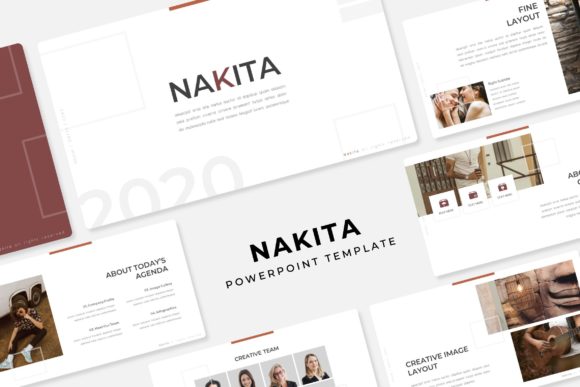
The visual personality of the Nakita PowerPoint Template strikes a balance between modern minimalism and functional density. It does not rely on flashy animations to distract; instead, it uses pixel-perfect illustrations and structured grids to guide the viewer's eye. The design feels approachable yet authoritative. It incorporates handcrafted infographics which are vital for breaking down complex statistics or processes. In an era of information overload, the ability to visualize data clearly using these pre-built assets is a significant advantage for marketers and strategists.
Visual Hierarchy and Brand Consistency
One of the most practical aspects of using a premium template like this is the immediate establishment of visual hierarchy. In design, hierarchy dictates what the audience looks at first, second, and third. The Nakita system uses section break slides to create breathing room between topics, allowing the audience to mentally reset before diving into the next concept. These breaks are essential for pacing; without them, a presentation can feel like an endless wall of text.
Furthermore, the template is based on Master Slides. For those unfamiliar with PowerPoint mechanics, this is the backbone of efficient presentation design. By editing the Master Slide, you can change fonts, logos, or color schemes across all 150 slides simultaneously. This feature is a lifesaver for brand consistency. If you are a small business owner aligning a presentation with your brand identity, you simply tweak the master layout once, and the entire deck updates to reflect your corporate colors and typography. It eliminates the tedious work of clicking through every single page to adjust margins or font sizes.
Practical Applications for Creatives and Entrepreneurs
The versatility of the Nakita PowerPoint Template extends far beyond the corporate boardroom. Because of its resizable and editable graphics, it serves as a robust tool for various professional needs.
- Portfolio Presentations: Designers and photographers can utilize the gallery and portfolio slides to showcase work. The picture placeholder feature allows for a drag & drop workflow, meaning you can replace stock imagery with your own high-resolution photos in seconds. This is crucial for visual creatives who need their work to speak louder than the slide design itself.
- Marketing Strategy: Marketers can leverage the handcrafted infographics to present campaign results or market analysis. The clean layout ensures that charts and graphs remain legible, supporting data-driven decision-making.
- Workshops and Education: The clear separation of content makes this template ideal for instructional design. The section break slides act as chapter markers, helping learners follow along with the curriculum structure.
While the template provides the structure, it is important to note that the photographs or pictures used in the preview are not included. This is standard practice in the design asset industry. It encourages users to source imagery that is unique to their project, ensuring the final product feels authentic rather than generic. Using your own high-quality images is recommended to maximize the impact of the layout.
Technical Execution and Usability
From a technical standpoint, the Nakita PowerPoint Template is designed for ease of use. The graphics are vector-based, meaning they can be scaled to fit different screen sizes—whether you are presenting on a laptop or a projector screen—without losing quality. The inclusion of 5 PPTX Widescreen files ensures compatibility with modern display ratios, preventing those awkward black bars that appear on the sides of outdated presentations.
Typography plays a subtle but critical role in these slides. The template utilizes a free font (with a download link included in the readme file), which is a thoughtful touch. It means you do not need to purchase expensive commercial licenses to achieve the intended look. However, for those looking to customize the deck further, the layout supports standard font pairing practices. You can easily swap the header fonts with a serif font for a more traditional look or a sans serif font for a cleaner, corporate vibe. The text hierarchy is already established, so changing the typeface usually retains the intended readability.
Ultimately, the value of the Nakita PowerPoint Template lies in its ability to save time without sacrificing quality. For the busy entrepreneur or the creative professional juggling multiple projects, having a reliable, modern typography