Metrico PowerPoint Template: A Complete Design Toolkit for Modern Presentations
Creating a presentation that looks professional and polished often feels like a bigger challenge than the content itself. You spend hours tweaking shapes, aligning text boxes, and searching for the right color combination, only to end up with a deck that feels disjointed. The Metrico PowerPoint Template solves this by offering a comprehensive design system rather than just a collection of random slides. It provides a structured yet flexible foundation that allows you to focus on your message while ensuring the visual delivery is consistent and impactful.
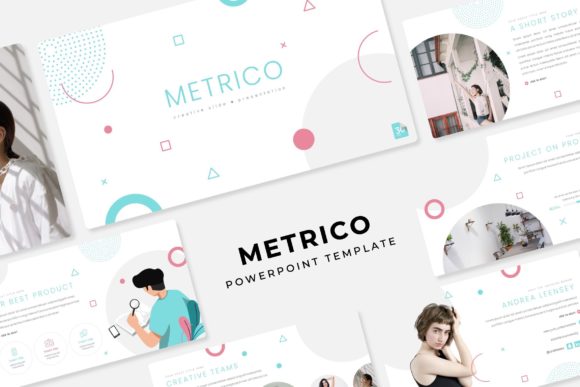
At its core, Metrico is built around the concept of modern typography and clean data visualization. The aesthetic is distinctly corporate but with a creative edge, making it suitable for everything from startup pitch decks to quarterly business reviews. The template avoids the cluttered look of older presentation software, relying instead on ample white space and precise alignment. This creates a "pixel-perfect" experience where every element feels intentional. Whether you are a designer presenting to a client or a small business owner pitching to investors, the visual personality of Metrico strikes a balance between seriousness and innovation.
Mastering the 150+ Slide Framework
The sheer volume of content included in the Metrico PowerPoint Template is one of its strongest selling points. With over 150 total slides distributed across 5 premade color themes, you have a massive library of layouts at your disposal. Each of the 5 color variations includes 30 unique slides, ensuring that you aren't just changing the background color, but actually getting a curated design that works with that specific palette. This structure is particularly helpful for maintaining brand identity. If your company uses a specific shade of blue or green, you can likely find a variation that matches, or easily adapt one of the master slides to fit your guidelines.
Working within this framework changes how you approach editorial design for presentations. Instead of building from scratch, you are curating. The section break slides are a standout feature, allowing you to pause the data-heavy flow and give your audience a visual reset. These breaks are essential for pacing a long meeting, preventing cognitive overload, and signaling a shift in topic. Furthermore, the inclusion of specific gallery and portfolio slides makes Metrico a versatile tool for creatives. Photographers, interior designers, and digital artists can use these layouts to display their work without the text competing for attention.
Practicality: Drag, Drop, and Edit
A beautiful template is useless if it is difficult to edit. This is where Metrico prioritizes practicality. The entire package is based on Master Slides, which means the underlying architecture is robust. When you change a font or move a logo on the master slide, it updates globally. This saves an immense amount of time and prevents the formatting errors that occur when manually editing individual pages.
The graphics within the template are fully resizable and editable. You aren't locked into static images. If an infographic is too large, you can scale it down without losing resolution. If you need to change the color of a specific chart segment to match your data, you can do so easily. The picture placeholders are designed for a "drag & drop" workflow. You simply drag your image file over the placeholder, and the software automatically crops and fits the image into the designated shape. This feature alone speeds up the production process significantly, allowing marketers and bloggers to create social media graphics or pitch decks in minutes rather than hours.
Visualizing Data with Handcrafted Infographics
Data visualization is often the weakest link in standard PowerPoint presentations. Metrico addresses this with handcrafted infographics. These aren't generic bar graphs; they are custom-designed visual assets that help tell a story. Whether you are displaying growth metrics, organizational hierarchies, or process flows, these graphics add a layer of sophistication to your brand identity.
For entrepreneurs and small business owners, the ability to present complex information clearly can make or break a deal. A confusing chart can erode trust, while a clean, well-designed visual builds credibility. Metrico’s infographics function as design assets that bridge the gap between raw data and audience understanding. They help establish a visual hierarchy, guiding the viewer's eye to the most important numbers first. This attention to detail elevates the presentation from a simple slideshow to a professional marketing tool.
Maximizing Your Workflow and Output
To get the most out of the Metrico PowerPoint Template, it is helpful to approach it with a strategy. First, review the Readme First file included in the package. It contains information regarding the free font download links. Typography is a critical component of web design and presentation layout; using the intended fonts ensures that your text renders exactly as the designer intended, maintaining the visual integrity of the serif font and sans serif font pairings used in the original design.
When selecting which of the 30 slides to use, consider your narrative arc. Don't feel obligated to use every slide. A strong presentation often benefits from restraint. Use the portfolio slides to showcase your best work and the data-heavy layouts to back up your claims. Because the graphics are vector-based, you can repurpose these elements for other digital projects, such as packaging design mockups or web design wireframes.
Ultimately, the Metrico PowerPoint Template is more than just a file; it is a productivity tool. It combines pixel-perfect illustrations with a user-friendly editing interface, making it a valuable asset for anyone who needs to communicate ideas visually. By leveraging its structured slides and customizable features, you can produce high-quality presentations that reflect the professionalism of your work. Note that while the template provides the structure, the photographs and specific pictures used in the preview are for illustration purposes only, allowing you the freedom to insert your own high-quality imagery that truly represents your project.