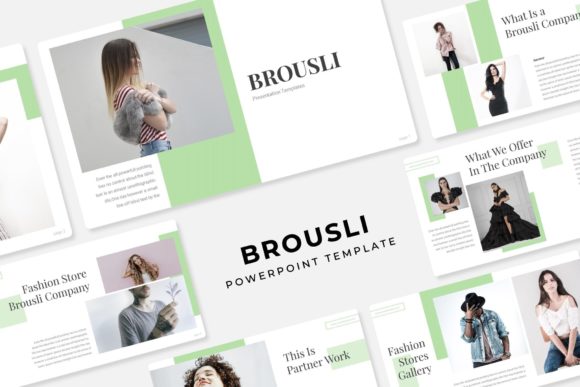
Brousli Power Point Template: A Deep Dive into Its 150+ Slides and 5 Color Schemes
When you're building a presentation from scratch, the process often feels like a race against the clock. You need a deck that looks professional, cohesive, and visually engaging, but you don't have the time to design every slide, choose every color, and perfect every alignment. This is where a well-structured template like the Brousli Power Point Template steps in. It’s not just a collection of slides; it's a complete visual system designed to help you communicate ideas with clarity and style.
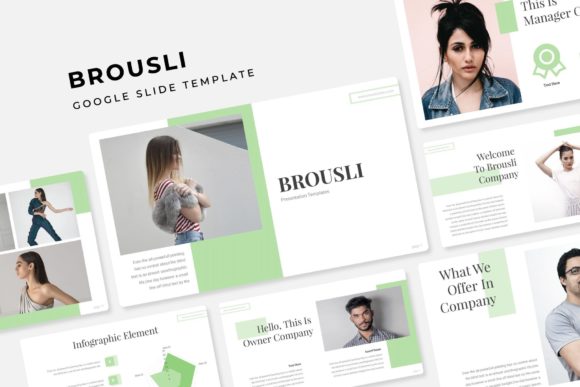
At its core, the Brousli template offers a substantial library of over 150 total slides. This volume is important because it provides genuine versatility. You're not locked into a single linear narrative. Instead, you have the flexibility to build presentations for a quarterly business review, a creative portfolio showcase, a product launch, or a detailed project proposal. The slides are organized across five premade color schemes, with 30 slides dedicated to each template. This structure means you can switch the entire look and feel of your presentation in seconds, simply by applying a different color variation. It’s a practical approach to maintaining brand consistency across different departments or campaigns without starting from zero.
Visual Characteristics and Practical Application
The visual personality of the Brousli template leans towards a clean, modern aesthetic. It avoids overly complex animations or distracting elements, focusing instead on strong layouts, clear typography, and balanced whitespace. This makes it a versatile asset for a wide range of professionals. A marketer can use the gallery and portfolio slides to present campaign results visually. An entrepreneur might leverage the handcrafted infographics to explain a business model or market data in a meeting with investors. The design is professional enough for a boardroom presentation yet creative enough for a design studio's client pitch.
One of the most significant time-savers is the inclusion of resizable and editable graphics with picture placeholders. The drag-and-drop functionality based on master slides means you don't need to be a PowerPoint expert to customize it. Replacing an image is as simple as clicking the placeholder and selecting your own file. The graphics are described as pixel-perfect illustrations, which ensures that even when scaled, they maintain their sharpness and professional appearance. This is crucial for maintaining a high-quality brand identity, whether you're presenting on a large projector screen or sharing a PDF on a laptop.
Where This Template Fits Your Workflow
Think about your last presentation. Did you spend more time wrestling with formatting than refining your message? The Brousli template is designed to eliminate that friction. For content creators and bloggers, it’s an excellent tool for creating visual summaries of blog posts or online courses. For small business owners, it provides a quick way to develop sales decks, internal training materials, or investor pitches without hiring a designer. The five included PPTX files and their widescreen counterparts ensure compatibility with modern displays and meeting room setups.
The practical guidance here is straightforward: evaluate the template's structure against your most common presentation needs. Do you frequently need to showcase visual work? The dedicated portfolio slides are a direct answer. Do you often present data? The infographics will help you avoid cluttered charts. When testing, focus on how easily you can adapt the master slides to your brand’s existing color palette and fonts. The template includes a free font download link, which is a thoughtful inclusion that helps you maintain the intended aesthetic right from the start.
Making the Most of Your Design Assets
Ultimately, a template like Brousli is a design asset that should serve your workflow, not complicate it. Its value lies in the combination of volume, organization, and editability. Having 150+ slides organized by color scheme gives you a robust starting point for almost any scenario. The handcrafted infographics and section break slides add professional polish that elevates the overall perception of your work. Remember, all photographs used in previews are for illustration only, so you’ll need to source your own high-quality images. This is standard practice and allows you to use imagery that is perfectly aligned with your brand or project.
By leveraging this template, you're not just getting slides; you're adopting a system for visual communication. It helps enforce consistency, saves significant production time, and allows you to present information in a way that is both engaging and easy to follow. Whether you're a designer pitching a new brand identity, a marketer outlining a digital strategy, or a hobbyist teaching a workshop, the Brousli Power Point Template provides a solid foundation to build upon, letting you focus on the story you need to tell.